
Parallax is when distant objects seem to move slower than close ones. In pixel art you build it from layers: the closest layer moves the most pixels per frame, the farthest moves the fewest, for example 4, 3, 2 and 1 pixels. To loop it smoothly, use as many frames as the canvas is wide.
What parallax is
Imagine you're in a car. The buildings along the road rush past, while the mountains far away barely move. That's the parallax effect, and it gives an animation depth.
Why it happens
Here's the interesting part: the close and the far objects actually move at the same speed. But your field of view gets wider with distance. So a far object needs more time to cross it than a close one, and that's why it looks slower.
Layers and speeds
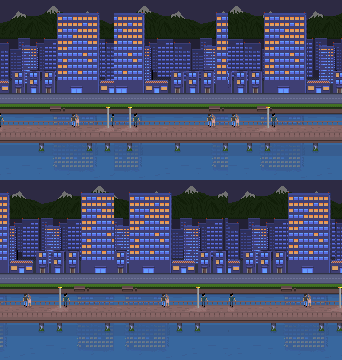
Parallax scrolling is made of layers that move a different number of pixels per frame. The closer the layer, the more pixels it moves, so the faster it goes. Usually they're grouped into background, midground and foreground.
- Layer 4, the mountains: 1 pixel per frame, the slowest.
- Layer 3, the distant buildings: 2 pixels per frame, twice as fast.
- Layer 2, the near buildings and the road: 3 pixels per frame.
- Layer 1, the bridge and the characters: 4 pixels per frame, four times as fast as the mountains.
Closing the loop
The animation should never stop in the middle and jump back. It should run smoothly to the end and come back in from the other side. For that, the number of frames has to match the width of the canvas for horizontal scrolling, or its height for vertical scrolling. The animation above is 114 pixels wide, so it has exactly 114 frames.
Try it small first


These three are from the challenge in my course. Each canvas is 62 pixels wide, so each loop has exactly 62 frames. The ground moves more pixels per frame than the clouds, so it feels closer. Make one of your own: a few layers on a small canvas, then count the frames.
Building it
This one is 320 pixels wide, so it needs 320 frames. Nobody draws those by hand. I split the platformer artwork into layers (bridge, near buildings with the road and water, distant buildings, mountains, background) and let a script in Aseprite generate the frames for each layer, at 50 milliseconds per frame: 4 pixels for the bridge, 3 for the near buildings, 2 for the distant ones, 1 for the mountains.
If you make games in Unity or Godot, your engine can do parallax for you. It's still worth knowing how to build it in the sprite, for prototypes, concepts and art you want to share.