Image to Pixel Art Converter
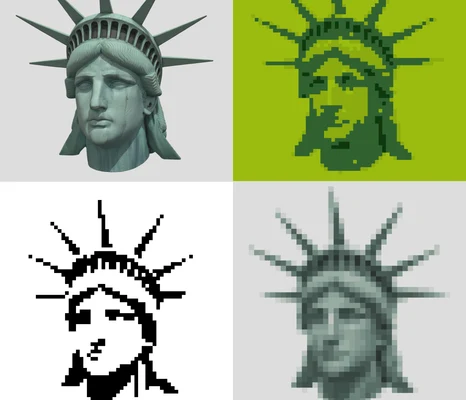
Drop in a photo or any picture and turn it into pixel art. It is free and works right in your browser, so your image never leaves your computer.
How to turn a picture into pixel art
- Add a picture. Drag it into the box, paste it, or click to pick a file.
- Choose the width. That is how many pixels wide the result will be. Around 32 to 64 looks like a game sprite. Go up to 96 or more for faces and scenes. For an icon or an avatar, crop it to a square.
- Pick the colors. Auto takes the colors from your picture. Or try a preset like PICO-8 or Game Boy for a retro look, or paste your own HEX codes. If the photo is dull, raise the contrast and saturation a bit.
- Remove the background if your subject sits on a plain color. Then add the dark outline and it starts to read like a sprite.
- Add dithering if smooth gradients look stripy. Leave it off for clean, flat shapes.
- Download or clean it up. Take 1× if you want to keep editing in Aseprite, or 8× to 16× to share it. Or click "Clean it up in the editor" and it opens in my free pixel art editor, with its colors in the palette.
A good start, not finished pixel art
To be honest, no converter makes real pixel art. It just averages colors, so you get stray pixels, soft edges and messy shading. Pixel artists place every pixel on purpose. Use the result as a sketch or a base layer, then clean it up by hand. The pixel art editor is one click away for that.
If you want to learn to do that by hand, my course goes through it step by step in Aseprite: shapes, outlines, colors, shading and details, all the way to full game art.
Learn to do it by handGet the free Pixel Art Starter Kit
Two cheat sheets from my course (Top 3 Rules and SPECC), a worksheet to practice lines and a sprite set to study. It's free, I'll email it to you.
After that, a short pixel art lesson from me every few days. You can stop them with one click.
Frequently asked questions
Is it free?
Yes. No sign-up, no watermark, no limits.
Is my image uploaded somewhere?
No. Everything runs in your browser. Your picture never leaves your computer.
What size should I pick?
For game sprites, 32 to 64 pixels wide. For faces and scenes, 96 to 160. Smaller looks more retro but keeps less detail.
How many colors should I use?
Start with 8 to 16. Fewer colors look bolder and cleaner. Old consoles used 4 to 16.
What is dithering?
A pattern of mixed pixels that fakes the colors in between. Floyd-Steinberg looks smooth. Ordered gives the checkerboard pattern you know from retro games. None keeps flat areas clean.
Can I edit the result?
Yes. Click "Clean it up in the editor" and it opens in my free pixel art editor in a new tab, with its colors in the palette. Or download it at 1× and open it in Aseprite.
Can I use my own palette?
Yes. Pick "My own colors (HEX)" and paste the codes, for example a palette from Lospec. Any text works, the converter finds the codes in it.
Can it remove the background?
Yes, when the background is a plain color around the edges. Tick "Remove the background" and move the tolerance until only the subject is left.
Can I use the result commercially?
The result is your own picture, just converted. So the rights are the same as for your original.
Is the result real pixel art?
Not yet. It is a good start. Real pixel art gets cleaned up by hand: clear outlines, no stray pixels, shading on purpose.