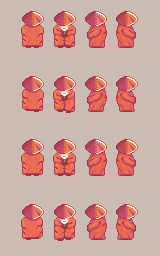
A side view walk cycle uses the same four frames as the front view: the starting pose, a step, the starting pose again, the other step. From the side, the legs move first, then the back and the head follow, and the bottom of the robe swings a little. Animate it below, then press Play.
This sprite is wide. It's easier to draw on a computer, or with your phone turned sideways.
Step 1
Colors for this step
This step also removes a few pixels. Use the eraser where the guide fades a pixel out.
Tools
Guide
Animation
Show the finished step
You did it!
Your sage walks sideways. Press Play: the small swing of the robe is what gives the walk its cadence.
The four directions
After the front walk, do the back first: it's the closest to the front. Feet, then shoulders, then the texture of the robe, then the hat. Then the sides: limbs first, then the back, the head and the texture.
What makes a side walk feel alive
The legs alone make a sprite slide. The cadence comes from the small things that follow them: the robe's hem swinging a little, the texture shifting with the cloth, the head going down a pixel on each step. Start simple, get the legs right, then add those details one by one and play the animation after each.
Left from right
Once one side works, flip a copy horizontally for the other side, then check the light. The light still comes from the same place in the game, so the highlights that moved to the wrong side need fixing.