
Straight lines are ratios
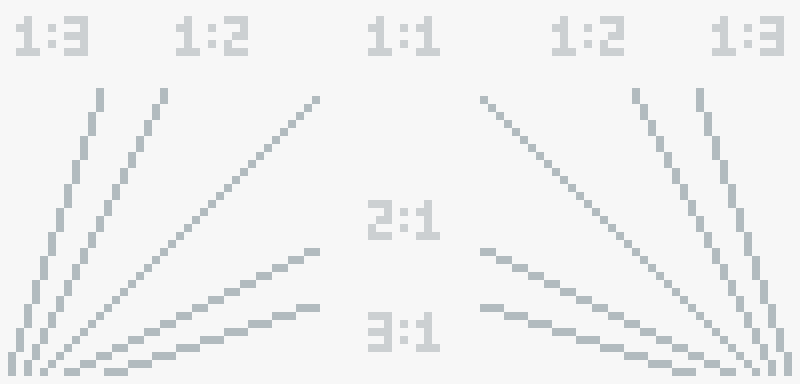
Every straight line in pixel art is about its angle, and the angle comes from a ratio. A 1:3 line goes one pixel to the side, then three pixels up, then one to the side, three up again. Count it out loud: one, one two three, one, one two three. A 1:1 line is pixels touching one by one, corner to corner: that's 45 degrees. In Aseprite you get it by holding Shift while you drag with the pencil.
Below 45 degrees the ratio turns around: 1:2 becomes 2:1, 1:3 becomes 3:1. And 2:1 is the one to remember: it's the line of isometric pixel art.
Why the ratio has to stay the same
Your eye reads the steps of a line. When every step has the same length, the line looks straight and clean. When one step is longer or shorter, the eye sees a bump, and the line looks broken. That's why we pick a ratio and stick to it from start to end.
Curves and the three mistakes
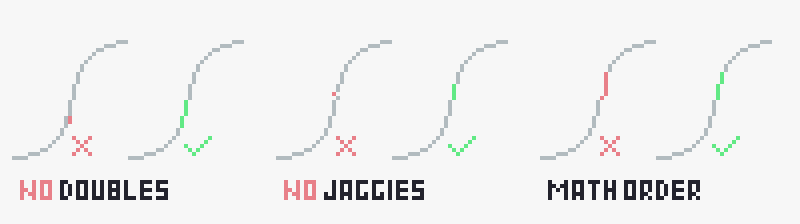
- Doubles. Two pixels side by side in a line, where one diagonal step would do. Parts of a line should touch only by the corner.
- Jaggies. A misplaced pixel that breaks the line.
- Math order. Along a curve, the runs change by one or a couple of pixels: 3, 3, 2, 1, then 2, 3, 4. Jump from 2 to 6 to 1 and the curve breaks.
Practice, then draw your own
Lines are the most basic skill in pixel art, and the hand learns them by repetition. The more the better. When the worksheet feels easy, close the guide and draw your own: a circle, an S curve, a line at an angle you pick yourself. Then check it against the three rules. That's the moment you stop copying and start drawing.