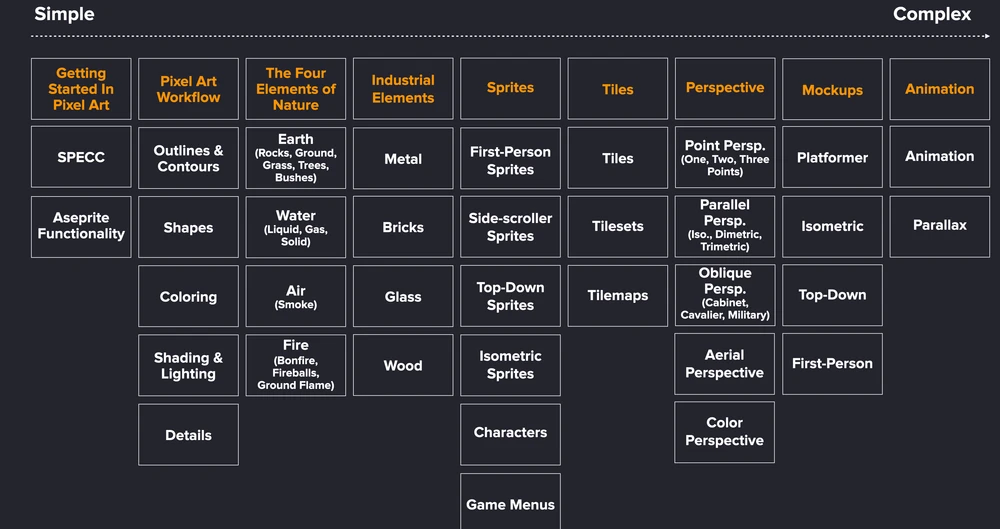
Learn pixel art from simple to complex: first the rules and planning, then lines, shapes, color and shading, then real objects (nature, materials), then sprites, tiles, perspective, whole game scenes and animation. Every step uses what you learned in the step before.
This is the roadmap of my course. It's built so every new task needs only what you already know. Go through it in order, and practice each step before the next one. Below each block is a free lesson, most of them with a trainer where you draw right in your browser.
How to get the most out of each step
- Read or watch the lesson.
- Download the resources, or open the trainer.
- Practice: make mistakes, experiment.
- Finish the artwork, then draw your own version without the guide.
- Share it and ask for feedback.
The roadmap, with a lesson for each step
1Getting started
2Pixel art workflow
3The four elements of nature
4Industrial elements
5Sprites
6Tiles
7Perspective
8Mockups
9Animation
How fast
Try to reach your first 150 practice hours as soon as you can: things start getting easier from there. Master 8 to 32 pixel sprites first, then, if you want, go to 64 and 128. Half an hour a day is enough to keep moving. More inhow long it takes to learn pixel art.